
OCEANMAIL / RESELLER GUIDE
API credentials and IPs
Create a tenant-scoped token and authorize your WHMCS server.
Permissions and prerequisites
The tenant owner or an administrator with API permission manages tokens. Provisioning and changing WHMCS reseller services requires a tenant administrator with full permissions.
- Sign in as the tenant owner or an administrator with API permission.
- For WHMCS provisioning and service changes, use a token owned by a tenant administrator with full permissions.
- Determine the actual outbound public IP of your WHMCS server.
Create the token
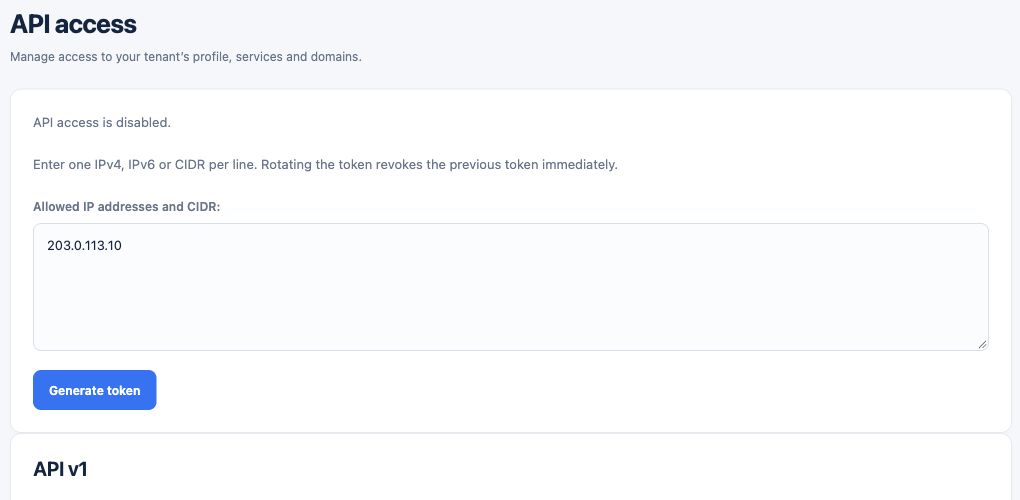
- Open Customer portal → API.
- Enter one allowed outbound IP or CIDR per line; a /0 network is rejected.
- Generate the token and securely copy the value shown once.
- In WHMCS, open Addons → OceanMail → API connection, save the token and test the connection.
Protect access
Treat the token like a password and allow only necessary server IPs. Each API request uses HTTPS and Authorization: Bearer <token>.
- Keep the token only in your authorized WHMCS environment and use HTTPS and Bearer authorization for requests.
- Update the allowlist and retest when the outbound IP changes.
- If exposure is suspected, rotate the token and update WHMCS; the old token stops working immediately.
Rotating or revoking a token immediately invalidates the old one. Update WHMCS and test again. A /0 network, which allows every IP, is not accepted.