
MAILOCEAN / HELP CENTER
Set up a domain and DNS
Verify ownership and configure your mail DNS records.
Verify domain ownership
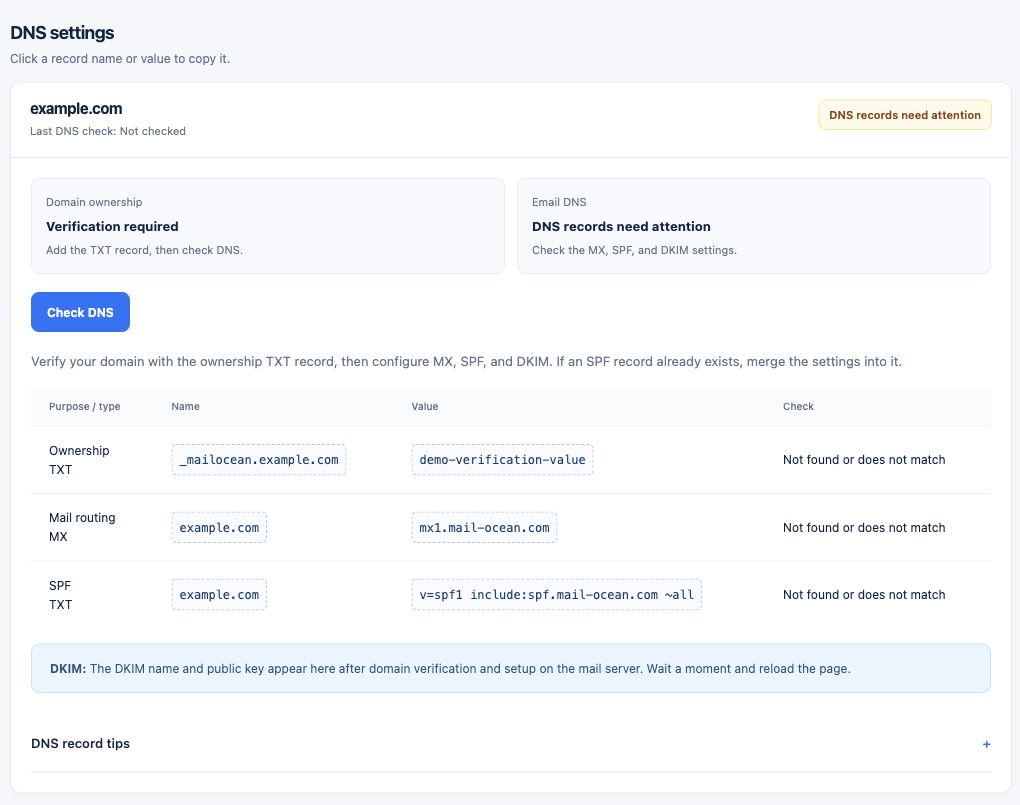
Add your domain under Domains in the customer portal, then publish the ownership TXT record shown for that domain at your DNS provider. Allow DNS propagation and run the check.
- In the customer portal, open Domains → Add domain and enter your domain.
- Open that domain from the list and copy the ownership-verification TXT name and value shown.
- Add the TXT record at your DNS provider, allow propagation and select Check DNS.
Prepare a domain for a new Team package
With an active service, you can verify a domain for a new Team package without linking it to your current plan. The temporary ownership challenge does not claim the domain or immediately create a package or mailbox seats.
- Under Domains → Add domain, enter the domain and select Prepare a domain for a new Team package.
- Add the displayed TXT name and value at your DNS provider, allow propagation and select Verify ownership. After successful verification, the domain is registered to your organization.
- Under My email service, select the new Team package and verified domain, review the quote and pay the invoice.
One Team service has one package and one domain. A temporary challenge expires after 24 hours and an organization can have up to 10 pending challenges. Wait 10 seconds between checks. Prepare the domain again if it expires; an active plan is required.
Configure email DNS
Add the MX, SPF, DKIM and other records displayed in the domain details and check again. Use the exact values shown for your own domain.
- Add the displayed email MX, SPF and DKIM records at your DNS provider using the shown type, name and value.
- If DKIM is not yet shown, check again after ownership verification and mail-server setup complete.
- Select Check DNS and review the result. Obtain the actual values from your domain’s page, not from an example screenshot.
Before switching
Review your existing email service and migration plan before changing MX. Duplicate SPF records or incorrect MX records can affect email delivery.
- Review your existing mail service and any data to migrate first.
- Plan when to switch MX and keep access to the old mailbox while verifying the move.
- Check how to merge SPF with an existing record instead of creating duplicate SPF TXT records; ask support if unsure.